
|
     |
| Sign In |
A few users of the Fueltrac.us website have had issues with their browsers not correctly displaying the diversion information within the Fueltrac system.
This is due to
Older versions of Internet Explorer having insecure settings that dictate how the browser communicates with Fueltrac.
Most versions can be fixed with some simple changes as mentioned below.
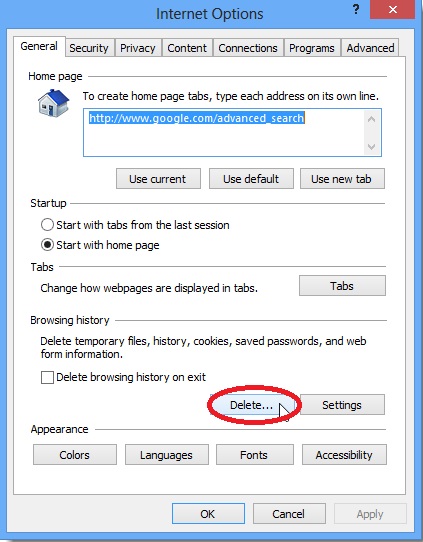
Step 1. Open Internet Explorers Internet Options and locate the button on the "General Tab" to Delete Browsing History.
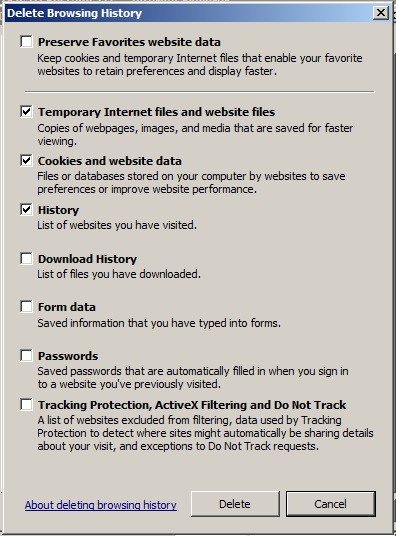
This will open a secondary window check or uncheck the boxes like shown below and click Delete,
Step 2. While still in the Internet Options now click on the Advanced Tab, and Scroll Down to the USE SSL Settings. Uncheck all
of the Use SSL boxes (Some browsers will not display Use SSL 2.0) and Check all of the Use TLS boxes like shown below.
Some browsers may only have Use TLS 1.0
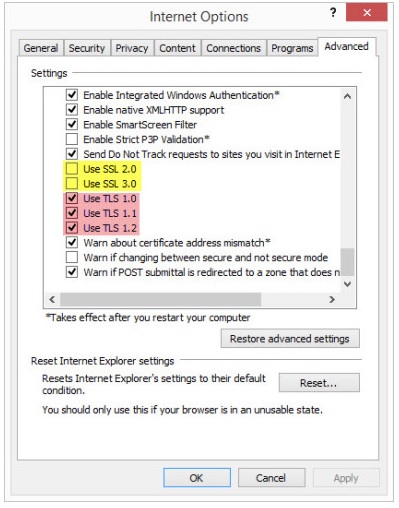
Once these changes are made Click Apply then Ok. Now close and reopen Internet Explorer and type in to your address bar
https://www.fueltrac.us You will now have a secure connection and all features will work
as expected.